Why Run Language Models Locally?
Advances in large language models made it easier for us to write and edit text, helping us create better content with less effort. However, relying solely on cloud-based services can be limiting due to internet connectivity issues, cost and data privacy concerns. Fortunately, local language models offer a solution by allowing you to run these powerful models directly on your own devices. In this blog post, we’ll explore the key concepts, features, and best practices surrounding local language models, helping you understand their capabilities and how to get started with them.
Learning Objectives
At the end of this lesson, you should be able to:
- Explain the advantages of using local language models compared to cloud-based services.
- Identify the necessary models, software frameworks, and hardware for running lanugae models locally.
- Describe how quantization enables the efficient deployment of language models on local devices.
- Select suitable local language models and serving frameworks based on specific use cases and requirements.
- Recommend hardware considerations to optimize the performance of local language models.
Language Models on Your Laptop? Yes, It’s Possible!
Many of you may have been introduced to large language models (LLMs) through ChatGPT, which has become synonymous with LLMs as one of the first to reach a wide audience. After OpenAI released an early demo on November 30, 2022, ChatGPT went viral on social media, leaving many users familiar only with this particular LLM. This narrow exposure may lead some to misjudge language models, assuming they are massive and cannot be run on commodity hardware such as a typical laptop. The reality is quite different: fast-forward a couple of years, and now we have smaller yet more powerful language models that can be easily deployed on your own laptop, even for free!
Cloud-based Vs. Local Language Models
When it comes to deciding between cloud-based and local language models, several factors come into play. You’ll need to consider cost-effectiveness, security and privacy concerns, ease of use, model size limitations, control over data usage, and flexibility.
Cloud-based LLMs offer a low upfront cost with recurrent subscription fees. However, they also come with the risk of cyber threats to your sensitive user data, which can be a significant concern for you and your organization. On the other hand, local language models provide greater peace of mind regarding security and privacy due to local data storage. This means you’ll have more control over how your data is used and protected. However, local models require more upfront investment in hardware and expertise for setup and maintenance, which can be a barrier for some users. Additionally, local models are limited by their smaller size due to hardware constraints. But they also offer flexibility without reliance on internet connectivity, which can be beneficial in certain situations.
Ultimately, the decision between cloud-based and local language models depends on balancing these trade-offs based on your organization’s specific needs and priorities. By carefully weighing the pros and cons of each option, you can choose the best solution for your unique requirements.
What Do You Need to Run Language Models Locally: Models, Software and Hardware
If you’re intrigued by the idea of running language models that surpass the capabilities of some frontier LLMs on your laptop, there are several key factors to consider. First and foremost, you’ll need access to a language model that meets your needs. While there are many options available, some popular choices include Qwen3.5, Gemma4, and GPT-OSS. Once you’ve selected a suitable model, you’ll also need a piece of software called a Language model serving framework to run it on your laptop. Popular choices include Ollama, LM Studio, GPT4All, and Jan. However, it’s essential to ensure that your computer has sufficient memory and processing power to handle the demands of running a language model. While it is technically possible to run a language model using just the CPU, having an NVIDIA graphics card can significantly optimize performance, making the experience more efficient and smoother overall.
Quantization: The Key to Running Language Models Locally
Quantization is a process used to reduce the size of a model by lowering the precision of its parameters, such as weights and biases. This is achieved by converting higher-precision representations to lower-precision ones while maintaining accuracy. For example, reducing 16-bit floating-point numbers to 8-bit integers can decrease both storage requirements (as smaller numbers require less space) and computation needs during inference time, making it possible to deploy large language models on devices with limited capabilities.
The actual conversion from higher to lower precision typically involves mapping the original values onto corresponding integer ranges. When converting 16-bit floating-point numbers into 8-bit integers, each 16 bits in a float can be represented by 8 bits or less in an integer. This process requires careful consideration of how values above and below certain thresholds are handled to avoid loss of information or biasing the model.
After quantization is complete, models must undergo dequantization during inference time. Dequantization involves reversing the effects of quantization by scaling back up from lower precision representations (like 8-bit integers) to higher precision values (such as 16-bit floats). This step ensures accuracy and reliability but requires additional computational resources.
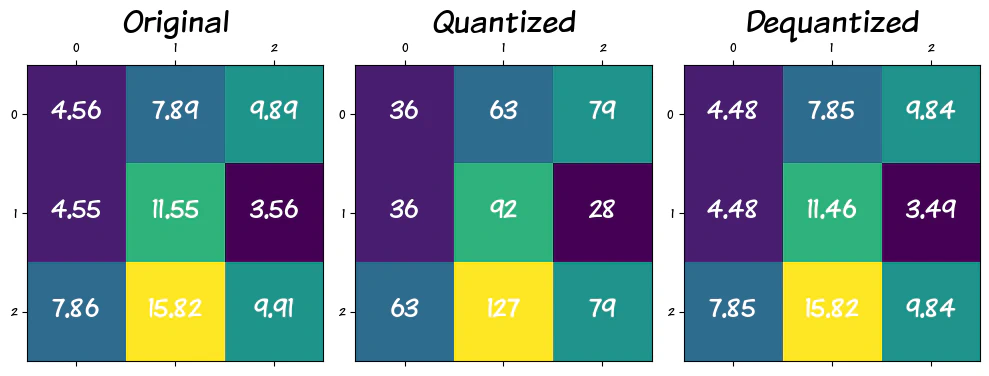
The figure illustrates how 9 parameters are mapped into an 8-bit integer space, followed by a scaling process that restores them to 16-bit floats. Notably, during this transformation, parameters 4.56 and 4.55 undergo a change, resulting in their dequantized counterparts being rounded up to 4.60. Interestingly, all parameters except one (15.82) are affected in some way by this process. The question arises: how significant are these slight parameter changes on the overall performance of a model? While these changes can be negligible in most cases, they do impact the model’s performance, and their effect is influenced by the level of quantization applied.
We can use perplexity as a metric to assess whether quantization affects text generation quality. Perplexity measures how well a language model predicts the next word in a sequence, with lower scores indicating better performance. This allows us to gauge the impact of quantization on the model’s ability to generate coherent and accurate text.
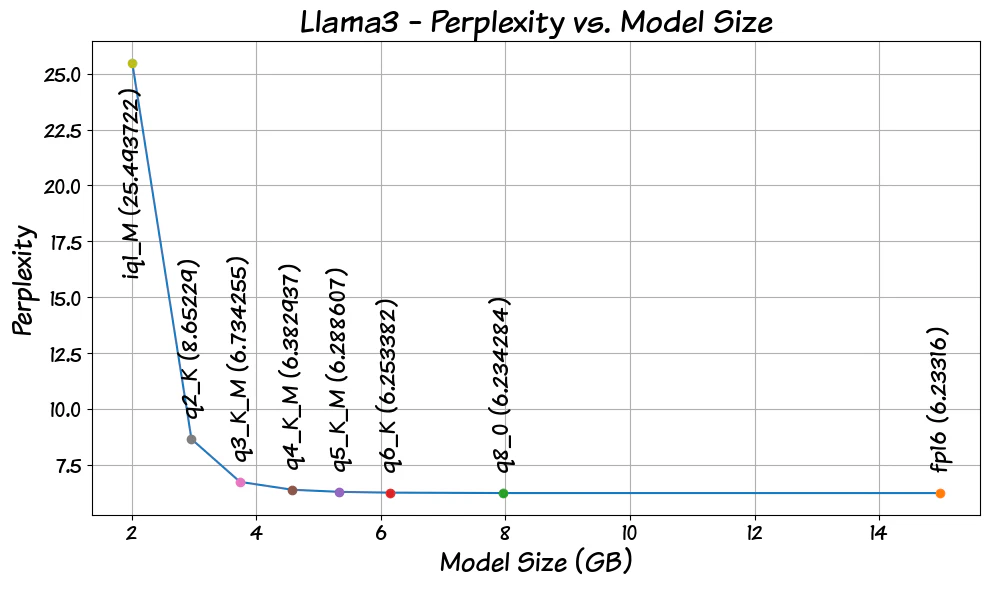
As you can see in the plot, the 8-bit quantized model (q8_0) has a perplexity almost identical to that of the full-precision model (fp16), suggesting it could serve as a drop-in replacement if we rely solely on perplexity for measuring model quality. Meanwhile, the 6-bit model (q6_K) exhibits a slightly higher perplexity than q8_0, implying it may be just as accurate as the original model. The clear advantage of quantization lies in its ability to accommodate an entire 7B-9B parameter model within GPU memory when configured for 8-bit or 6-bit operation, leading to substantial performance enhancements for local LLM models. Notably, perplexity appears to increase beyond the 4-bit model (q4_K_M), indicating that sticking to a 4-bit configuration or better is a wise decision.
Selecting the Right Model for Your Use Case
When it comes to selecting a local language model, one-size-fits-all might not be the best solution. While there are many models that excel at a wide variety of tasks, a more tailored approach is necessary. One way to gauge how a model performs in a particular area is through language model benchmarks.
When selecting a language model, I follow a multi-step approach. Typically, it starts with a web search to identify available options. Given my hardware constraints, I tend to opt for the largest model that I can run on my GPU’s memory. To further evaluate the candidates, I consult a local language model leaderboard like Onyx (https://onyx.app/self-hosted-llm-leaderboard) , which provides a general idea of each model’s performance relative to others in its class. Next, I examine language model benchmarks to gain a more detailed understanding of how each model compares against its peers. Finally, I take the top contenders and test them with real-world problems that require specific solutions, allowing me to determine which model best meets my needs.
Obtaining language models is relatively straightforward, thanks to built-in mechanisms within language model serving frameworks. In many cases, these frameworks default to 4-bit quantized models. If you prefer a more manual approach, you can download models from online repositories like Hugging Face (https://huggingface.co/) . When selecting a model, choose an instruct-tuned model if your intention is to engage in conversation with the model. Instruct-tuned models are specifically designed to understand and respond to conversational input, making them ideal for chat applications. By contrast, base models primarily function as text completers.
Choosing the Right Language Model Serving Framework
I’ve experimented with numerous local language model serving frameworks over the past couple of years. While I don’t have an exact count, I estimate there are at least 50+ options available. Most of these frameworks are built on top of llamacpp, an open-source language model serving framework (https://github.com/ggerganov/llama.cpp) . The limitations in these frameworks often stem from the same constraints present in the version of llamacpp they’re based on. Some local language model serving frameworks come as all-in-one desktop apps with user-friendly interfaces, making them accessible to a broader audience. Others employ a client-server model, where users interact with the framework through an application programming interface (API) or a command-line tool.
When choosing a language model serving framework for your needs, you have several options to consider. Among the four frameworks mentioned in the blog post - LM-Studio, GPT4All, Jan, and Ollama - three of them (except Ollama) fall under the desktop app category. If your primary use case involves chatting with the language model in a way similar to interacting with free ChatGPT, a desktop app might be the most suitable choice for you.
However, if you wish to pair the language model with a third-party UI or an editor of your preference, Ollama’s (https://ollama.com/ ) client-server model is a great option. All four frameworks are actively being developed, with new versions released on a weekly or monthly basis. As they frequently receive new features, a feature comparison may not be as useful as it would otherwise be.
For those starting out and using laptops equipped only with CPUs, GPT4All (https://www.nomic.ai/gpt4all ) might be a good option to consider. All four frameworks support retrieval-augmented generation (RAG) pipelines, making them powerful tools for searching and retrieving information from external knowledge sources. Additionally, these frameworks allow interfacing with online LLMs such as ChatGPT, Gemini and Claude.
All four frameworks come in the form of single-file downloads and are easy to install by simply downloading and clicking on the installer. Desktop apps like LM-Studio and Jan expose their functionality through an OpenAI-compatible API, making them accessible to third-party apps and editors. Additionally, all four frameworks have built-in mechanisms for searching and finding language models.
Essential Hardware Upgrades for Optimal Performance
You don’t necessarily need a powerful laptop with an NVIDIA GPU and lots of VRAM (Video Random Access Memory) to run language models, but having one is certainly advantageous. Technically, you can still run language models using just your CPU, but the experience will be much smoother and faster if you have a dedicated GPU on board. Even 4GB of VRAM can be useful, as some of the layers of the language model can be offloaded to the GPU, freeing up resources for other tasks and improving overall performance. However, having at least 8GB or more of VRAM will allow you to run larger models in their entirety on the GPU, taking full advantage of its processing power and reducing reliance on your CPU.
As for laptops with dedicated NVIDIA GPUs, prices can vary depending on the amount of VRAM available. Laptops equipped with a 4GB NVIDIA GPU typically fall within the price range of 800−1,200 USD. In contrast, laptops featuring an 8GB or more NVIDIA GPU usually cost between 1,200−2,500 USD. For those looking for high-end options, laptops with 16GB or more NVIDIA GPUs can range from 2,000 to 4,000 USD or more.
Keep in mind that these are general price ranges and may vary depending on other factors such as the laptop’s processor speed, RAM capacity, display quality, and brand.
Final Thoughts
Now that you’ve explored the world of local language models, you know that leveraging them offers numerous benefits, including improved performance, reduced latency, and enhanced security. By downloading and installing a suitable framework, you can access a wide range of language models, each with its unique capabilities and strengths. With the right hardware upgrades, such as dedicated GPUs, you can unlock even more potential from these models. As you integrate local language models into your own projects, you’ll be able to create faster, more accurate, and personalized language tools.
Related Posts
Beyond Guesswork: Grounding LLMs in Facts
All large language models (LLMs) have two fundamental limitations: LLMs lack knowledge of events that occurred after their training date, a phenomenon known as the knowledge cutoff, and they tend to generate incorrect or fabricated information, often referred to as hallucination.
Read more
LLM Settings
Large language models offer a suite of adjustable settings that enable users to precisely customize their output and behavior. These parameters, including temperature, top p, frequency and presence penalties, maximum sequence length, stop sequences, and context length, are fundamental to controlling aspects such as the randomness, diversity, and structure of generated text.
Read more